
Start on the dashboard
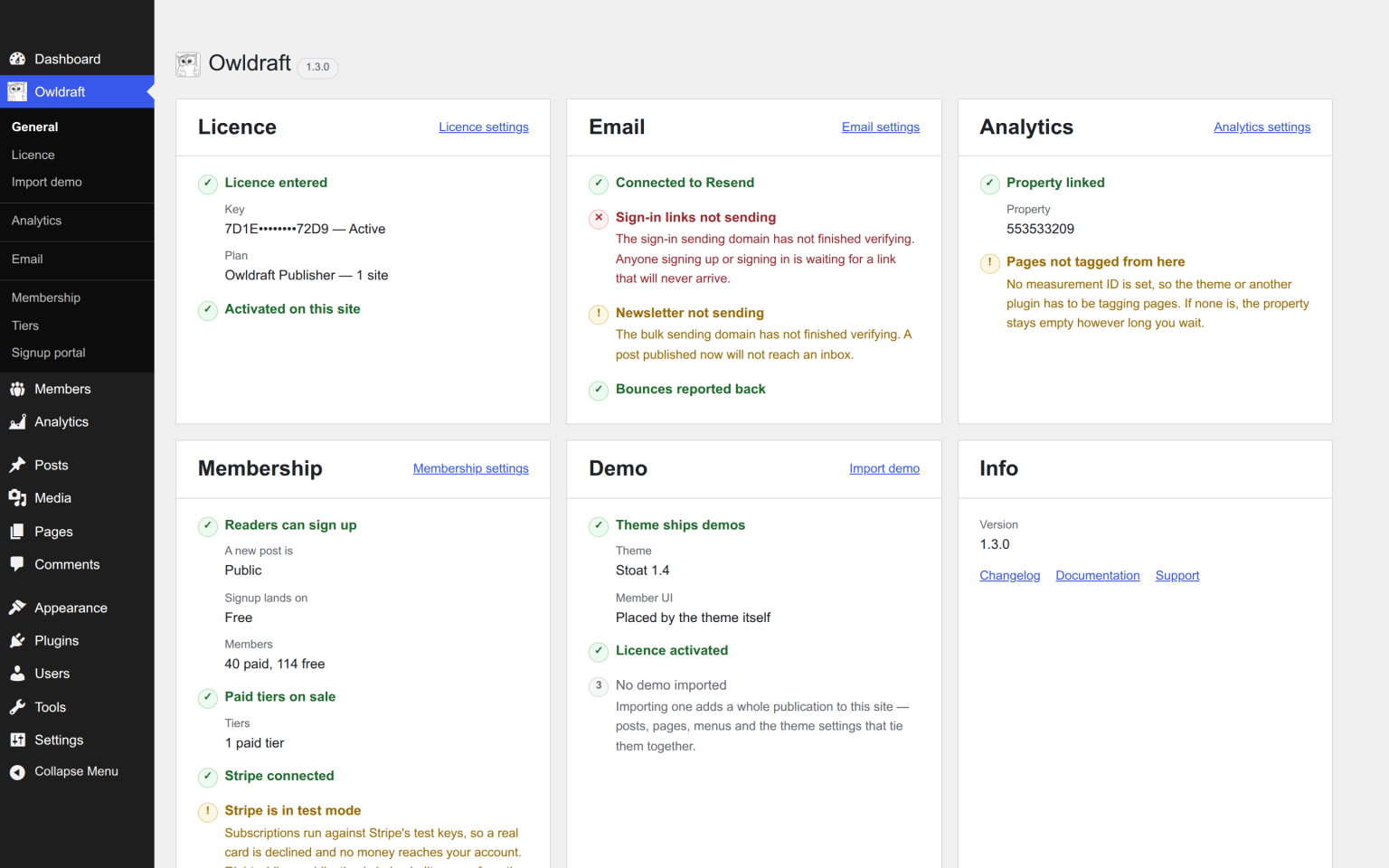
OwlDraft → General is one card per part of the install, and every card answers the same three questions in order: is this part working, what goes wrong if it is not, and what is it set to.
The second one is the point. Not connected in amber tells you a fact about a settings screen; it does not tell you that a post published tonight will not reach a single inbox. The cards say the consequence in your terms — mail that will not send, a reader who cannot sign in, a card that will be declined — and link to the screen that changes it.
The screen writes nothing and makes no network calls, so it is always safe to open.
Readers cannot sign in
- Is a sign-in page set on OwlDraft → Signup portal, and does it have the Sign in / Sign up block on it?
- Is the reader’s message in their activity feed on the Members screen? Sent, delivered, bounced, or nothing at all?
- If nothing left at all, mail is the problem, not sign-in: OwlDraft → Email, then Send test.
- If it was delivered and they still cannot get in, the link has probably been used or has expired. Ask for another.
Readers never sign in at wp-login.php and never have a password. If somebody is being shown a password form, they are staff.
Mail is not arriving
The order that finds it fastest is in bounces, unsubscribes and the mail log. Most of the time it is one of two things: a sending domain that stopped verifying, or an API key that was rotated at Resend and not here.
A payment went through but the member is still free
The webhook is what grants access, not the payment. So:
- Your site must be reachable over HTTPS from the public internet. Stripe cannot deliver to
localhost, to a site behind HTTP basic auth, or to a staging box with no certificate. - OwlDraft → Membership → Stripe shows Last event received. If that is old or empty, nothing is arriving.
- Resync from Stripe on the same screen pulls the current state in by hand. It is also the quickest way to tell a webhook problem from a key problem: if the resync fixes the member, the key is fine and the webhook is not.
A reader’s card failed and they lost access
They should not have. Stripe retries a failed card for about two weeks and emails the customer itself, and most of those recover — so access stays open the whole time. What Stripe is doing about a subscription and what the reader is entitled to are two separate facts here, deliberately.
If a reader did lose access immediately, their subscription was cancelled rather than retried. Stripe’s dashboard says which.
A paid post went out looking public
Check the badge on Posts → All Posts rather than the post. If it reads nothing, the post was public: either it was set that way, or it inherited a Site default of Public.
Remember that your own account passes every gate. Check in a private window, signed out, not as yourself.
The whole post appeared above the paywall
There is no teaser, so there was nothing to cut down to. Add a Read more block after your first few paragraphs, or write an excerpt. There is no automatic teaser, on purpose — an automatic one would be the first fifty-five words of the thing the reader has not paid for.
The newsletter went to the wrong people
The Email box on the post records what happened: the audience, the sender and the counts. A post is emailed once, so this is a thing to fix for next time rather than something to re-run.
The two usual causes are an audience left on All subscribers when it should have been Only paid, and a Custom by plan selection with the Free bucket still ticked.
The OwlDraft screens are blurred
No licence key has ever been confirmed on this site. Open OwlDraft → Licence — it is never covered — and enter the key from your receipt.
Everything looks fine and nothing works
Two questions worth asking early:
- Is Editorial Blocks still active? Publisher runs on it. Without it, Publisher loads nothing at all rather than half-working, and the Setup screen is the only thing it shows.
- Is WordPress cron disabled? Newsletter sends, the segment sync, the nightly reconcile and the licence check all run on it.
Still stuck
Open a ticket at owldraft.com/support, and say what the dashboard cards say. If the answer is that Publisher does not do the thing you need, we will tell you straight — including when the answer is no.