
Members — its own item in the sidebar, sitting under OwlDraft. One row per reader, and the numbers a publication actually watches across the top of it.
Its submenu is the same five views the screen has: All members, Free, Paid, Newsletter, Bounced.
Staff never appear here. Anyone who can edit a post is staff, not audience, and they are edited under Users as they always were.
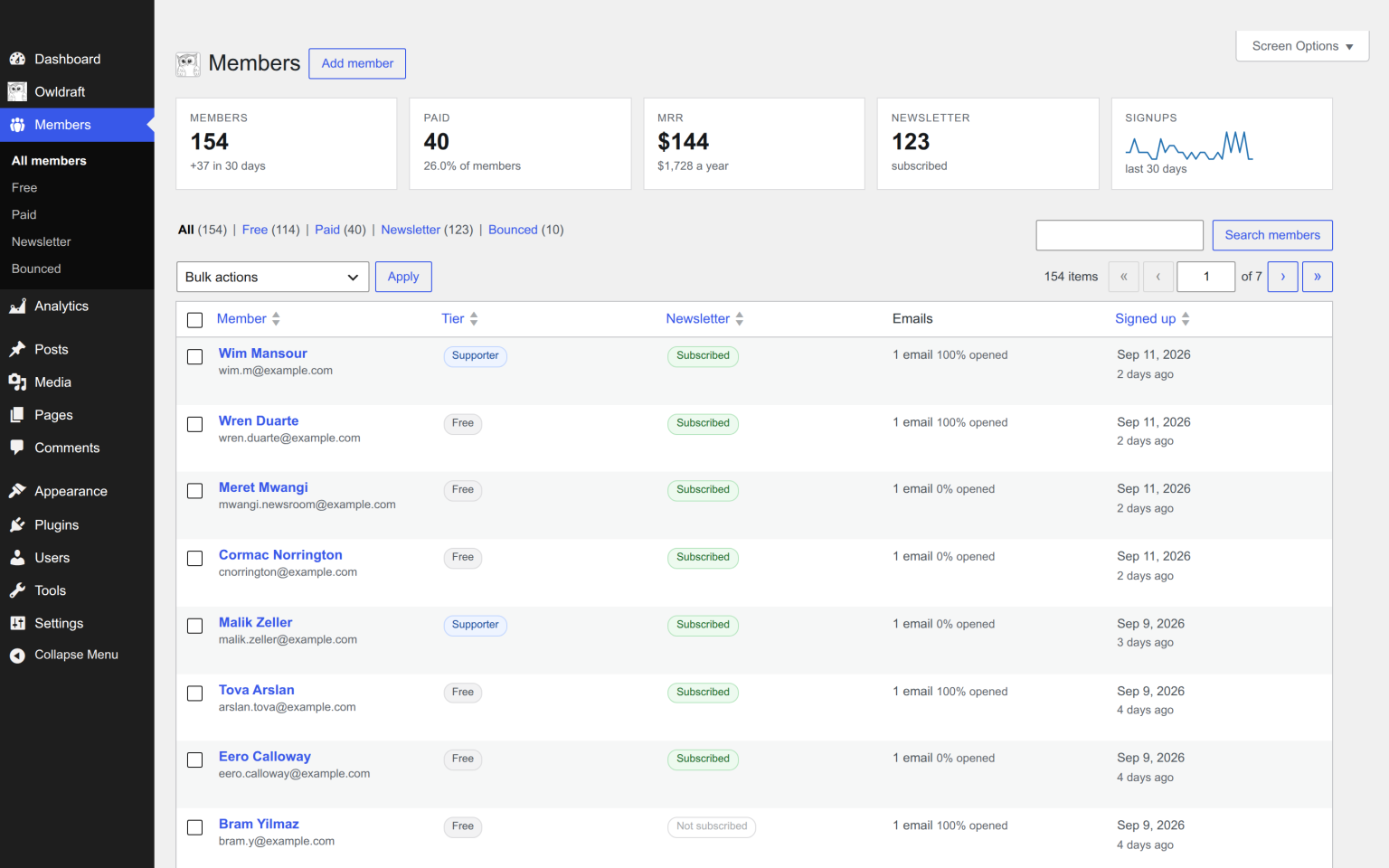
The strip across the top
| Members | Everybody with an account, paying or not, and how many arrived in the last 30 days. |
| Paid | Paying and comped readers, and what share of the list that is. |
| MRR | Your paid tiers priced out per month, with the yearly figure under it. |
| Newsletter | How many have opted in. |
| Signups | The last 30 days, as a sparkline by day. |
MRR is worked out from your own tiers and the readers standing on them. It is a rate, not an accounting figure and not a forecast: it says what the list you have today is worth at today’s prices. What was actually charged, refunded or disputed is Stripe’s to answer, on a dashboard you already have.
Add member, beside the heading, opens WordPress’s own Add New User screen. A reader added by hand starts free and unsubscribed; set their tier and their newsletter box afterwards, on their own screen.
The five views
Above the table: All · Free · Paid · Newsletter · Bounced, each with its count.
Bounced is the one to visit occasionally. It holds every reader whose address hard bounced, who marked an email as spam, or who unsubscribed — the people you are no longer allowed to mail. A growing bounced count on a list that is not growing is usually a sign that a sender needs attention.
The columns
| Column | What it says |
|---|---|
| Member | Their name and address, with the avatar they uploaded if any. Manage opens the reader; Email opens your mail client. |
| Tier | Free, or the tier name. A comped reader reads Supporter (comped). |
| Newsletter | Subscribed, unsubscribed, or the suppression that stopped them — bounced, complained. |
| Emails | How much of what you sent them they opened, as a percentage, and when they last opened or clicked. |
| Signed up | When they first appeared. |
Sort by clicking a heading. Search matches name and address. Screen Options sets how many rows you get.
Bulk actions
Tick some rows, then:
- Change tier to … — one entry per paid tier, plus Free. Moving a reader onto a paid tier this way comps them: they get access, nobody is charged.
- Subscribe to newsletter / Unsubscribe from newsletter
- Delete
Every one of these is a real change to real readers and there is no undo, so the usual advice applies: filter to a view first, check the count, then act.
Bulk actions can only ever touch members. A staff account swept up in one would be a privilege bug rather than a tidy-up.
What this screen deliberately does not have
A payment history. What someone used to pay, when they upgraded, what they were charged and whether it was refunded are questions Stripe answers better than we could. Mirroring them here would be a second ledger to keep correct, and a second ledger that disagrees with the first is worse than no ledger at all.
A CSV importer. Bringing a list over from Substack, Ghost or Mailchimp is a one-time job with real decisions in it — which tier each row lands on, who is opted in — and it is done with WP-CLI or an import plugin against wp_users rather than through a screen that would be used once. Ask us and we will help.
Next: one reader, up close.